Wednesday, December 24, 2014

How-To Sites

This is a mirror of http://earthweareone.com/100-amazing-how-to-sites-to-teach-yourself-anything/

100 Amazing How-To Sites to Teach Yourself Anything

Learning new skills and expanding your knowledge doesn’t have to cost you an arm and a leg. There are loads of free resources on the Web that can help you find instructional videos, tutorials and classes to learn a wide variety of skills from fixing basic car problems to speaking another language. With 100 sites to choose from, you’re bound to find something here that will help you learn just about anything you could want.
General Tutorials
These sites offer a wide range of tutorials and videos.
  1. Expert Village: One of the biggest how-to sites on the Web, this site is home to hundreds of thousands of videos on an infinitely broad spectrum of topics.
  2. LearnThat.com: With categories like business, finance, home repair, and computers and tech, this site has plenty of classes for avid learners.
  3. Koonji: With tutorials that are extremely easy to follow, this site will make it simple to learn just about anything.
  4. SuTree: Whether you want to learn new skills or share some of your own, you can do both on this video how-to site.
  5. VideoJug: With great videos on topics as diverse as doing well on the SAT and knitting a scarf, you’ll be able to find just what you’re looking for here.
  6. FindTutorials.com: This huge collection of tutorials contains listings for education, hobbies and DIY projects around the house.
  7. TrickLife: Want to make your life better? This site is home to numerous tutorials to help improve your home, your body and your personal well-being.
  8. Instructables: This site offers a wide range of video tutorials where users can showcase all their valuable skills.
  9. MyTutorials: Search through the tutorials on this site to find just what you’re looking to learn.
  10. Tutorial Ninjas: From investing to getting healthy, you’ll find loads of tutorials here.
  11. Hodder Education: Check out this site for a range of self-learning opportunities in sports, music, health and more.
  12. Sofia: Promoting free sharing of intellectual assets, this site offers several free courses in programming, typography and geography.
  13. I Can Learn Anything: Pay this site a visit to get access to a wide range of social learning resources.
  14. Wikiversity: With over 10,000 free learning resources, you’ll find tons of great instructional materials here.
Around the House
Want to know how to fix that broken cabinet or hang up some great wallpaper? These sites are all about helping you learn how to fix things around the house, on your car or even learn a new hobby.
  1. Make Magazine: If you’re looking to turn your old laptop into something cool, or find new and inventive ways to spruce up your home, you’ll find loads of ideas on this site.
  2. What the Craft: With a little instruction from this site you can create hand-tailored clothes or great new pillows for your couch.
  3. Skillvids: Save money on costly home repairs by learning how to do them yourself on this site.
  4. Jonko Online Auto Repair: Here, you’ll find some instructional help on fixing all the little things that can go wrong with your car.
  5. DoItYourself.com: Whether you’re trying to sell your home or manage your finances, you’ll find some helpful guidance here.
  6. Fix Expert: Learn some of the basics of car maintenance and repair from this site.
  7. Easy2DIY: Want to know how to lay carpet? Fix your leaky dishwasher? You’ll find that and more here.
  8. Free DIY Tutorials: Visit this site to learn how to construct a range of sewing and crafting projects.
  9. The Bicycle Tutor: Why pay someone to fix your bike when you can do it yourself? This site can teach you how.
  10. Grovetech PC Repair and Maintenance: Check out this site to learn how to do some basic PC repairs like adding additional RAM and cleaning off all those nasty viruses.
  11. ReadyMade: This site can help you learn to build things you never knew you could do on your own.
  12. Hack a Day: Embrace your creative side with these hacks that help you learn to reuse the junk around your house in cool new ways.
  13. Howtopedia: With loads of tips on how to make your DIY projects greener, this site will help you make your home and the earth a little better at the same time.
Business and Management
If you feel like you’re seriously lacking on business and management skills at work, no need to worry. These sites can help you learn the basics and get your career on track.
  1. KnowThis?: Boost your marketing skills by taking one of the tutorials offered through this site.
  2. Leadership Training Tutorials: Like the name suggests, these free tutorials are all about helping you bring out your leadership skills.
  3. Laynetworks: Those who want to learn more about great management skills can find tutorials galore here.
  4. Website 101: If you’re an entrepreneur who doesn’t know much about running a business online, this site is home to loads of tutorials that can help you understand what it takes to establish a great web presence.
  5. Business Tutorials: Whether you want to start your own business or need a little guidance once you have, this site will provide all kinds of helpful tutorials.
  6. Passion for Business Learning: Learn more about business skills from management to finance on this site.
  7. Business Balls: While the name might be silly, the site offers some serious advice and information on improving management and business skills.
  8. ComputerWeekly: Those in the IT field should take advantage of this site’s free weekly webinars to stay up-to-date on the latest information and developments.
  9. TechOnline: Designed with electronics professionals in mind, this site has dozens of great tech-focused tutorials.
  10. Change Management: Here you’ll find instructional materials to improve your skills in leadership and management.
Language and Writing
Those who want to learn a new language, improve their writing skills or just learn more about literature will be well-served by these instructional sites.
  1. BBC Languages: With numerous languages to choose from, this site offers visitors some really valuable free language learning materials.
  2. Project Gutenberg: Catch up on reading the classics with the free e-books offered here.
  3. Teach Yourself Japanese: Whether you’re learning for business or pleasure, this site offers all kinds of resources for Japanese language learners.
  4. Literature.org: The extensive library of free material on this site makes it cheap and easy to read up on just about any subject.
  5. Bibliomania: With free books and study guides to go along with them, you’ll not only be able to read the classics but get help understanding them as well.
  6. LookLex: Here you’ll be able to learn the basics of the Arabic language with free audio tutorials.
  7. American Sign Language Browser: If you’ve ever wanted to learn ASL you’ll find a number of resources here that can get you started.
  8. Learn Spanish: As one of the most widely-spoken languages in the world, there’s no better time than now to start learning Spanish.
  9. Writer’s Resource Center: This site is home to loads of support and information on writing better fiction.
  10. Paradigm Online Writing Assistant: Need some help writing? You’ll find instructional articles here.
Technology
These tech-focused sites offer help to both technophiles and beginners alike.
  1. actDEN: Never learned how to use Microsoft Excel? Now you can with free tutorials on this site, offering education on a number of computer programs.
  2. How-to Geek: From setting up to fixing problems, this site will help you learn to get your gadgets up and running.
  3. W3Schools: Learn just about anything you could want to know about Web design and development from the large number of tutorials on this site.
  4. KillerSites: Here you’ll find loads of free info on web design and hosting.
  5. Productivity Portfolio: Are you really not good with technology? Here you’ll find tutorials designed just for you, with simple 5-minute lessons on the basics of programs like Outlook and Firefox.
  6. Tweako: This site is home to numerous tutorials focused on technology, programming and the net.
  7. Vista4Beginners: Many people find Vista hard to navigate, and if you’re one of them you can find help on this site, filled with great tutorials.
  8. Digital Arts: From tips on using Photoshop to what it takes to make great web designs, this site will help you embrace the creative side of technology.
  9. InPictures: With tutorials that come complete with visual representations of how to do everything, this site is perfect for the visual learner.
  10. N Design Studio: This site is focused on Dreamweaver and Illustrator, providing a wide range of tutorials.
  11. NetTuts: Check out this site if you’re in need of a little help with a web development project or want to learn more about programming on the internet.
  12. Geekpedia: Here you’ll find tutorials on just about every programming language you could want to learn.
  13. MuppetLabs: Programmers and aspiring geeks alike can find numerous tutorials here on languages like C++ and Perl.
Math
Many people struggle to understand mathematical concepts. These sites offer help and instruction no matter what level you’re on.
  1. S.O.S. Mathematics: Check out this site to find tutorials and worksheets to help you learn more about math and get a little practice applying it.
  2. MathVids: If you’d rather learn from videos, the instructional ones provided here will be helpful to you, offering explanation of a wide variety of math issues.
  3. Math Cracker: Get a little help on math subjects from the basics of algebra to the intricacies of calculus with a variety of helpful tutorials.
  4. Real World Math: Think your math teacher was full of it when he said you’d actually use the math you’re learning? This site applies all kinds of math to real situations, making it easier for many to see how it might be valuable.
  5. Math for Morons Like Us: Even the smartest people can sometimes forget their multiplication tables, but if you feel especially weak in math you may want to check out this site. It breaks down even complicated ideas into easy to understand lessons.
  6. Math.com: With some great tools and a variety of tutorials on algebra, geometry, trigonometry and more, this site has loads to offer learners.
  7. MathTools: If you’re using MATLAB you can get some information on how to better use the program and understand what’s going on with these free tutorials.
  8. Paul’s Online Math Notes: This professor wants to help you learn math, and offers notes, lessons and more.
  9. Visual Calculus: The modules on this site are designed to help you see visually how calculus works, an easier way to learn for many who struggle to understand abstract concepts without illustration.
  10. PurpleMath: Visit this site to find notes, tutorials and lessons on a variety of math subjects.
Science
Learn more about the amazing world around you from its chemical makeup to the processes going on in your own body with these helpful sites.
  1. The Chem Team: Learn the basics of chemistry with the tutorials and lessons provided by this site.
  2. Get Body Smart: With interactive animations and activities, this site makes it fun to learn about how the body works inside and out.
  3. The Physics Zone: You can get a better grasp on concepts like magnetism and motion with this site that offers instruction on the theoretical and mathematical aspects of physics.
  4. The Life Wire: Here you’ll find a number of animations and tutorials that are designed to help you learn more about biology, even the stuff that may have confused you before.
  5. Geology Rocks: The earth may seem like a stable, static entity but it’s always changing and moving. Check out this site to learn more about these processes and the ground under your feet.
  6. NASA: If Earth isn’t your thing, take to the heavens with videos, photos, articles and podcasts all about the stars, planets and what lies beyond.
  7. Inner Body: Check out this site to learn a bit about the circulatory system and find out just how that cheeseburger is clogging your arteries.
  8. Exploratorium: Also called the Museum of Science, Art and Human Perception, you’ll find lessons here on everything from how music works to the effects of global warming.
  9. Science A-Go-Go: This site is a great place to learn about the latest and greatest scientific discoveries. You can take to the discussion forums as well if you’d like to debate any topic.
  10. The Why Files: If you’ve ever wondered why or how a news story about science is true or want to learn more about everyday science, check out this site.
Creativity
These lesson-filled sites offer a chance to learn more about art, music and digital creativity.
  1. Berklee Shares: Here you’ll get access to loads of free Strobist: Check out this blog and its tutorials to learn the basics of lighting in photography.
  2. Teoria: On this site you’ll find a number of music-related tutorials and lessons to help you better understand music theory.
  3. Digital Arts: Need a little creative inspiration? This site can help you out and help you better learn to use your digital art tools.
  4. PSDTUTS: Whether you use PhotoShop to touch up your drawings or to make completely digital works of art, you’ll find helpful tutorials here.
  5. Photography Mentor: Join this site to get educational videos for your computer or iPhone to learn more about digital photography.
  6. E-Chords: The video tutorials on this site can help you learn to totally shred on the guitar or bass.
  7. DrumBum: If drums are more your style, these tutorials and lessons will help you master a variety of types of music.
  8. Music Theory: Ricci Adams teaches the basics of music theory and notation with lessons and tutorials on this site.
  9. Computer Music Products: Want to make and distribute music right from your computer? This site can teach you how.
  10. Duey’s Drawings: If you’ve always been envious of those who can draw and paint, give this instructional site a visit for lessons on how you can improve your skills.
  11. Video-Tutes: Learn a number of useful things about shooting and editing videos from the instructional tutorials on this site.
History
Expand your knowledge of the past with these history sites that contain info, photos and lessons on numerous topics.
  1. Archive.org: With links to information on the history of music, documents and even the Internet, this site is a one-stop-shop for learning.
  2. Library of Congress: With numerous digitally archived photos, documents and manuscripts, as well as a few wholly online exhibits, you’ll find a wealth of great information on this site to help you learn about American history.
  3. The Rosetta Project: No matter what language you want to learn about, still spoken or long dead, you’ll find its history and loads of information about it here.
  4. Digital History: This online project offers users a wide range of digitized historical information to make learning easy and fun.
  5. U.S. Census Bureau: Get the stats on just about everything you could want to know about Americans on this site.
  6. Biography: Learn a little more about the people who have shaped the world we live in today with the information from Biography.
  7. Artcyclopedia: Wanna know a little more about the history of art? You’ll find information, photos and resources galore here.
  8. History Channel: Even if you don’t have cable you can watch videos, engage in interactive programs and read all about world history on this site.

Tuesday, November 25, 2014

Heralding Secure Builds

Here is how to leave a build out in Second Life so that it cannot be altered:

ANTI-TAMPERING

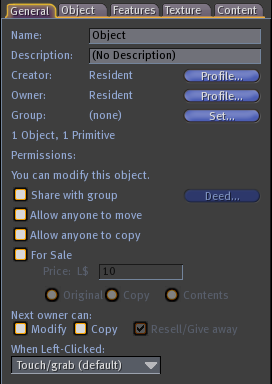
 The Second Life "default permissions" that you see when you rez a new prim to Second Life are a good starting place. 

http://img4.wikia.nocookie.net/__cb20060621063045/secondlife/images/4/46/Object-editor-general.pngin Edit Window General Tab:  


Not Shared with group
Not Allow any to move
Not For Sale

 You can alter these for various reasons, but then you need a secure build, one that cannot be tampered with, revert these settings to default for all prims and objects in the build.

 Next owner permission don't matter for objects not for sale, but best to leave them restricted until you decide to sell your build. If you do make your build "For Sale", make it a "copy" sale so the original stays in your possession and where it is.


<http://www.avatarplanet.com/blog/wp-content/uploads/2009/03/MakeVideoScreen_002_300px.jpgin Edit Window Object Tab:

Not Physical
Not Locked

The one change that can make your build MORE secure than the default settings is Locked.  when an object is locked, you can not edit your object until you un-check "Locked" for that object.  If you gave edit permissions (more on this below) to friends or a group, they still cannot edit your locked build.


https://s3.amazonaws.com/images.wiki.secondlife.com/images/thumb/6/64/Viewer2Tips-Avatar-FriendsPermissions.png/600px-Viewer2Tips-Avatar-FriendsPermissions.png

In your Friends Window, 

one last default is that none of your friends has modify rights on your objects.  You alone can give or remove this right for them. You can see who has this right on your friend list in most viewers.  It's a simple matter to de-select anyone who should not have that right.  Be stingy with with it.  Even if there is someone you want to have that right, you can LOCK any of your builds so that no one can modify your build: not you, not your friends, not your group members, not until you UNLOCK it.


BULK EDITING BUILDS

First, these setting help you edit much quickly, even with large builds with multiple objects and unlinked prims:

  • Check "Select only my objects" in your Tools Menu so you can't select other people's objects. 
  • Choose a draw distance large enough to make your whole build visible to you in you Preferences window Graphics tab.
  • Un-check "Limit Select Distance" in your Advanced Menu so you can select any objects that you can see, even if they are more than 65m from you.


 How To Select Multiple Items video from http://vimeo.com/31667862
Open your edit window Crtl-3 and left-click hold and drag the yellow selection box over an area to select all the prims in the area.  This selects much faster and securely than shift-clicking them one by one. 

Now you should see an edit window reading "Multiple Selections" with owner named you.  Now, with just a singe click, you can set perms and many other parameters of the all the selected prims at the same time.

Revert to these secure settings named above: 
Un-check "Share with group", "Allow any to move" and "For sale"
Un-check "Physical"
Last, check "Locked" so that you yourself cannot change the build by accident.

Now close your edit box and check your work.  Get a clever friend to see if they can move your things.  Rejoice if they cannot.


Last, SL can fail you when regions go down, return times expire, parcels can change group permissions, or you can click something you didn't mean to, like "temporary" and you can lose your work.  The remedy:

Save often.  Back up often


  • Save copy to your inventory.
  • Give a full-perm (copy, modify, transfer permitted to next owner) copy to another account
  • Use a back-up feature that some viewers offer to put builds on your own hard-drive.

Wednesday, June 19, 2013

Immortal Herald

While "Blackdog Ashbourne" isn't a well known avatar in RP circles, his "Empower Magick" Hud is gaining users and notice from competitors across Second Life.  In an unusual marketing standard, updates to the Magick hud are free to users for life.  Updates occur every few months, with not just more spells and effects added, but features and interface improvements based on customer feedback.

 Now, on the heels of that product, Blackdog  is wrapping up a public beta test of a new RP HUD called "Empower Immortals".  The website blurb I first encountered reads:

Empower Immortals

Immortals walk among us!
You may have reached this page by receiving an Awaken or Feed request from an Immortal.  If so, click here for information on what it means to roleplay with Immortals and how to opt out if you do not want to receive further requests from them, or read on to learn more about the system.  This system is currently in Beta testing, with a release planned mid 2013.
In this Second Life Role-Playing system, get the HUD, choose your species, select your abilities and begin the adventure!  There’s a lot more than Humans, Vampires and Lycans out there.  Fae, Dragons, Angels, Witches, even Gods, Devils and Demons to name but a few.

The game doesn't work on you if you don't opt-in.   The opt-out system is rather simple: a TP, touch a prim at the home store (where the game itself has been disabled) and the none of the players can target you.  While looking into it, I  I caught the usually pixie-looking Blackdog in a few quiet moments to do this interview, continued by e-mail and copied here.


Arth:   Another vampire HUD?  Why develop "Empower Immortals"?
BDA:  I was approached by one of my "Empower Magick" users who wanted a "better vampire HUD", since the current offerings didn't meet their needs.  It seemed like a great opportunity to go a step further - there's a lot more than Humans, Vampires and Lycans out there and the existing systems don't support them.  So we've done it in a way that supports Vampires, non-vamps who like to role play with Vampires whilst maintaining the integrity of who and what they are (e.g. Fae, Angels, Witches - you name it) and even made it relevant to those who don't like Vampires and want to be able to deal with them as an equal when they encounter them.

Arth:  What issues did the players have with the other vampire systems in SL?
BDA:   Well, the main objection was having to pay to play.  We've designed Immortals so that once you purchase the system, it is complete and self contained.  All of the items you need to go with it are available for free.  You don't pay for Vitae, which is the life force that fuels Immortals - Vampires think it's in the blood, whereas an Angel may consider it to be Eternal Light.  You don't pay for refilling limited attacks.  You don't have to buy the extra RP items, such as Gems to store Vitae or Cages to hold souls - these are all available for free.  Over time, third party providers may well sell special versions of these and we don't object to that, but there will always be a free version available.

Another of the guiding principles we were requested to follow was that the system should not encourage groups to have their members gather so much of this or that in order to remain members.  So souls in our system have no value other than sentimental.  It's all about the Vitae, which can be obtained for nothing.

Once we decided to have the system support so many different species, the limited choices available in the current systems turned out to be another objection people had, they just hadn't mentioned it until we suggested it.

We were also asked to include as many of the relevant special effects as possible - animations, sounds, particles - all of which are used for turning, changing or the various other functions the system provides, so that people didn't have to go and buy something else to get the effects they want.  This is a tough one, but we've built the system in a way which means people can customize a lot of it and make it work just the way they want.
 
Arth: There is also the issue of  Vampire systems (like Progeny and Bloodlines) being treated as a banning offense on many sims because they see the systems harassing and spamming non-players.  Will Empower Immortals be any different?
BDA:   It sure will be.  The systems you've mentioned come under attack either because they prompt for permission, or because they don't, so it's one of those things where you can't please all the people all the time.  Our approach has been to not prompt people who are already using the system and ask those who aren't for permission before acting upon them.  Since this can still be contentious, we've also allowed land owners to control the system's behaviour, or even whether it's allowed, by adding a short string to their parcel description.  In addition to that, individuals can opt-out of the system entirely without having to purchase anything, simply by clicking on a crystal in our store.  They will then never be prompted again and are "off limits" to all Immortals RP.  Similarly, if they want to play along for free, they can opt-in in a similar manner.  That gives them access to our website and lets them choose their species, without having the full experience available when purchasing a HUD.  For many who just want to RP with Immortals, that may be all they want.


Arth:   Will owners of your "Empower Magick" HUD have any advantage in "Immortals"?
BDA:  Immortals will be available as either a standalone HUD or a module that Empower Magick users can load into their existing HUD.  It works with Empower Magick, but it is in no way required that you have them both.  One doesn't really have an advantage over the other and we've made sure that owners of other spell HUDs aren't disadvantaged, but the two do work nicely together as you'd expect from two products made by the same people.

Arth:  How did you settle on the name "Immortals"?
BDA:  We wanted a name which encompasses Vampires as well as the various other species that the system supports.  Even Humans are powerful in this system, so it needed to be a term that set them apart from the mundane, rather than anything specific to a particular class or species of character.  Of the many attributes which define Vampires, the one which seemed to cover all the other "Specials" that the system supports was immortality.  Even a human may be elevated to Immortality, allowing them to deal with Vampires on their own terms.

Arth: When and how did you begin the actual work on the Immortals HUD?
BDA:  The initial request came through on 3 June 2012 and I cut the first line of code on 9 June 2012.  Since I take a very collaborative approach to the work I do, I started out by consulting with my closest advisers from Empower Magick, some of whom are Vampires, then extended it to a small group of core Vampire RPers, those who RP with them and more importantly, those who have absolutely no interest in Vampire RP.  By the end of June, we had our first design and a prototype HUD up and running.  It's been through a lot of changes and refinement since then, of course, but the core is much the same.  Of course, I had the advantage of having the Empower Magick base to build on and it really accelerated our ability to get this up and running fast.

Arth: So, after a year of development and play-testing, what happens next?
BDA:  We want to see the system run for a good time with no changes.  We're already locked down to "bugfixes only".  We'll need a little time to work on packaging and marketing and we're still considering sales models - in-world only, marketplace, only from other Immortals who are prepared to train those they sell to - but however we do it, it's not far away now.  After that?  Well, we're very much driven by the requests of the users of the system.  As you noted with Empower Magick, where we have the same approach, this resulted in quite frequent updates adding new features in its early days.  I'd expect Immortals to go along similar lines.  Although it's had a good soak during Beta and that resulted in a lot of improvements, we already have quite a store of requests and great ideas which we had to refrain from implementing to ensure stability as we prepared the system for release.  The sky and the imagination of our team and the community of Immortals is the limit.

Arth:  Blackdog, thanks for taking the time to chat with me. Good luck with your release.  

You can visit the store to find out what's happening, and get some freebies at Blackdog's Smallhaven sim.

Monday, December 31, 2012

How I write.

When composing lectures or posts like this, it is at least a six step process for me.

The first is to listen to what others are asking to find topics. Often I have simple short answers and direct references with easy links.  When there are deeper and more interesting ideas unexpressed,  I gather together the knowledge and wisdom and ideas needed to answer the questions fully.   Then everything gets bound into a single document with little organization, just an olio of ideas.  Often things stay in this way for a long, long time until a delivery time and date is chosen.

The first draft can be very very long and repetitive, but it's taking my scroll of notes, copying it, and thinking about an organizational pattern that is suitable to the material.  Then it's shuffle the information around into an order that might work as a lecture or essay. 

After that at-least-third draft by now, the chore is to consider exactly who and when the information is to be delivered and what illustrations and examples to include for those who might have interest and tailoring the material for them, looking for references and citing what I find.  Now it is close to a final form, and it's copy it all again, and go thru for grammar, spelling , brevity, consistency and all those other things scholars honor.

Now, often the same material might work for two mediums, say a lecture in Second Life and a ethereal scroll(-ing webpage) online.   Then it's construct each format for its medium. In Second Life, in example, I can use objects in illustration, but not in a scroll(-ing webpage). Conversely, I can use images freely in scrolls, but not so easily in SL.

When making both a lecture and a scroll, I will prepare for a lecture by constructing a draft but not publishing the online page.  Then, at lecture time, I copy and paste from my scroll draft copiously.  During the lecture, I often receive insight and questions from the attendees that crystallize important points, or tell me what points need exposition, clarification or example.  I quickly provides those on the fly during the lecture slot if I can.  Then, after the lecture, those additions and amendments get edited into the scroll draft, and finally, the scroll can be released.  This page is an example of such a scroll: 
http://aulethesmith.blogspot.com/2012/08/a-history-of-elvish-weaponry-part-1.html

I could make illustrated classroom books like this one about Sheriwood in Second Life with book writers, but I dislike that medium due to the handling of images and loss of copyable text.  To compress data and image for a "page" degrades both the image and the text some, making the text non-copyable into other media (a good idea sometimes, but not always) and the information available only in this very specific context:
  • computer on, in SL viewer, 
  • logged into that account, 
  • object rezzed, 
  • camera oriented, and 
  • little distraction  
That is a bit hard to achieve, compared to
  • computer on
  • browser open, 
  • web page loaded

Often, when I find such things as images or note cards in SL, I will, with the author's permission only, mirror the book to a blog post like this: 

http://aulethesmith.blogspot.com/2011/05/how-to-create-rp.html


Thursday, September 6, 2012

Multi Chan Hax

This is a mirror post of Mistress of Design's Random Rambling, Tips and Tricks advice on skin and clothing template tools forSecond Life. I'm exploring using it with Gimp per

Multi Chan Hax is all kinds of Awesome!

Multi Chan Hax is all kinds of awesome!!!

Why is Multi Chan Hax all kinds of awesome? Because it gives Second Life clothing and skin creators a whole range of different template layouts to choose from! With Multi Chan Hax you are no longer limited to texturing the standard head/upper/lower UV layouts.

“A mapping channel is basically UV data. It’s how a 2d texture gets translated onto the geometry of a 3d model. What MultiCH does is give Photoshop the ability to translate a texture to and from any single combination of the channels.”

This type of feature is usually limited to 3d software but Multi Chan Hax manages to blur that line and make the same features available in a 2d image editing programs. How cool is that?! For anyone who has ever complained about wanting a different layout to texture, this is basically the answer to your prayers! All you need is the MCH filter and the MCH files and you can make something respectable in less than half the time it would take to manually match it up pixel by pixel.

—————

Before you get too excited there are a few things I should mention. Multi Chan Hax is a 32bit Photoshop filter so it won’t be available from the filters menu if you choose to run a 64bit executable of Photoshop. Multi Chan Hax is also limited to Windows, so Mac and Linux users are out of the loop.

The Multi Chan Hax filter works with any program capable of loading the 8bf filter format so that means a handful of programs other than Photoshop should be able to make good use of it. PaintShop Pro is one of them and GIMP can too, with the help of a PSPI which is a GIMP plug-in that runs 3rd-party Photoshop filters, such as this one.

—————

If you want to follow along you will need to grab a few things:

Chip’s Templates or Robin’s Templates

Multi Chan Hax- Filter

Multi Chan Hax- Files

Flaming Pear’s- Solidify filter

—————

PhotoShop Plug-In Translator for Gimp


Earlier this week the TechSlop wiki went down and it might take a while to be sorted. Abu Nasu has graciously allowed me to host the MCH filter and files on his behalf until it’s fixed.

I’ve managed to grab a copy of the MCH Repository page through googles cache system which means I can leave the details and description to The Master himself.

————————–

MultiChan Hax Filter

You will need to install this filter into Photoshops plugins directory before you can use the files below.

————————–
SL_legpatternwerapfull01_c2

Designed for creating patterned stockings. The ratio is 1:2, so watch out for that. (This is the filter used in the two-part MCH video)

SL_mucho23chans

One day I got into the mood to do a bunch of mapping channels. So I did a bunch of channels. Some head shots, legs, torso stuff, and things. Can’t say for sure what all of channels are what because I didn’t take any notes on them. However, I do remember a few. The very first channel is all head, upper, and torso with each tucked away in a corner. Channels 21, 22, and 23 are the individual head, upper, and torso chunks.

SL_legsx2

Contains two different MCH files for legs. One of the MCH files in this rar was used in Map Chan Hax Leg Seams. The other one is more like the default mapping and may be more intuitive.

SL_shouldersx2

Contains two different MCH files for working with the shoulder areas. One has 2 channels and the other has 3.

SL_head02

This is the MCH file that is almost identical to the one used in the Multi Chan Hax Head tutorial.

SL_jacketwaist01

A quick little ditty for matching upper and lower for the jacket layer. Designed for documents with a ratio of 2:1, so start with 1024×512 or so. The upper will be on the left and the lower will be on the right. After that, chop it out and go. There are two different seam channels that are very similar. One has the front in the middle and the other has the back in the middle for full wrap-around goodness. Didn’t cover the entire jacket layer, but I did get the bulk of the seam between upper and lower. I used the default female mesh and that had some effect on the operations. Should be okay to use for male design, but I haven’t tested it specifically for male distortion

SLarm_female_c6a

Description: Several mapping channels for working with the female arm.

SLarm_male_c6a

Several mapping channels for working with the male arm.

SL_skirt01_c3

Really quick cylindrical mapping channel for the SL skirt. Quick as they are, they work uber dandy for SL skirt seams.

SL_maletorsoplanar01

Real quick planar mapping on the male torso. No arms, no legs, or head. Just quick planar on the front and back of the male torso. The first channel has the default mappings, and the second channel has the planars. The second channel is mostly like the first, but the back is extremely lower. I could have laid second over the first, but that would lead to confusion. With the back extremely lower, easy to see which channel you are looking at with a glance. Should be pretty decent for placing logos and similar on the front and back. Remember that the mapping is planar and thing will distort as the 3d mesh curves around.

------------------------------------------

Thanks for posting, Claire!

Saturday, January 21, 2012

the Game of Bumps

Children's games often train skills of coordination and speed. This is "tag", re-invented for Second Life as a simple and fun way to master control of your avatar in active areas.

BUMPS

The Basic Rule: When "it" bumps you, you have to bump someone else, then say you did so in chat to make someone the new "it"

Object: to avoid being bumped by and therefore becoming "it". As "it", to accept the role in chat and then bump another and announce who the new "it" is in chat.

Equipment: any area roughly 40m across. It need not be utterly clear of obstacles nor fully delineated.

Players: any number greater than two.

Preparation

The group chooses a player to be the first "it". Traditionally, this role belongs to the player who suggests the game or whoever was "it" at the end of the last game.

The players choose an ending time of the game. All players are prohibited flying in the game.

Suggested: Each player opens the "Bumps, pushes & hits" window in the "help" menu, so one can see who made contact with oneself, or wears a script that tells when such things happen.

Optional: Each player can activate a radar or a map, either thru a viewer or a HUD (like Mystitool), so one might see who is close and who is not.

Playing Bumps

~ "It" chats a sentence saying "I am it".
~ "It" attempts to physically bump another player by avatar.
~ Other players move inside the playing area to avoid "it".

~ When "it" actually bumps another, their hit windows will confirm it.
~ "It" must chat, by any sentence he chooses, the name of who he bumped within hearing (20m) of the one he bumped.
~ Others and "it" may move and repeat that that idea until:

~ The one bumped acknowledges "it" in chat.
~ He or she becomes the new "it" and play continues as above.

Ending the game.

Anyone may, but the person who suggested the game must announce in chat "5 minutes left", "one minute left", "ten seconds left" and "Good Game."
The last "it" loses the game, but that hardly matters, does it? Now enjoy sharing what happened.

Irregularities:

"It" crashing appears to others as "it" disappearing, or going motionless. When this happens, or "it" must leave for a while, the others should gather in the center of the playing area and choose a new "it". Traditionally, "it" is assigned to the one who bumped the crashed "it" or the first "it".

Being "Out of Bounds" incurs no penalty because it isn't much fun. One should simply return to the playing area directly when discovered out of bounds. One can still bump or be bumped while out of bounds.

One can quit the game by going out of bounds and stating "not playing" as often as needed, but it is bad manners to re-enter the game after quitting.

When flying is noticed, the one flying should immediately return straight to the ground with "page down" only. If "it" is under the descending flyer, the bump counts and may be called. If "it" is the flyer, no bumps need be acknowledged until "it" lands and spends 10 seconds motionless.

Missing chat: One may, if bumped, accept "it" before the old "it" announces one was bumped, but it's better to remind the old "it" he or she needs to announce who was bumped. Handle someone not replying to a chatted bump after several chats as "it" crashing.

Players joining mid-game can learn the basic rule as they play if others guide them thus: When "it" bumps you, you have to bump someone else, then say you did so in chat to make them the new "it".


Strategies,
with links to more complete player guides:

The real object of the game is to improve the players ability to move, chat, and view the world screen in rapid succession. In more detail:

To move, use the keyboard arrows (or ASDF if your chat is closed) alone or in combination with shift and/or your mouse. To activate running, use Menu/World/Always Run, or Ctrl-R toggle.

Views include the default view where you see your avatars back, mouse-look where you see thru the avatars eyes, and custom focus views. Try using mouse-look (activated by mouse-scrolling your view into your avatar's head or pressing M with chat closed) and regular view (activated by escape key or M in mouse-look) and Custom focus. Each one of these might be preferable to you at different times, and each allows different custom options.

Chatting begins in mouse-look with the Enter key, then type your chat and press Enter again to send. If out of mouse-look, click your chat window, then type your chat and press Enter to send. If you can see another player's name-box floating over their head, they can hear you in regular chat. If the name-box has dimmed to invisibility, they are out of normal chat range, and you must move close to them or send a "shout" (using control-Enter). One can repeat the last thing said with control-up (ctrl-↑) then pressing Enter.

Game Variations:

~Voice can make an easier game if all have voice on and use it instead of chatting who bumped whom and who is it.

~Automating bumps would make an easier game if each player wears a scripted object that says bumps in chat, so "it" need not chat the bump. The new "it" must still chat that they are "it" unless all wear a script that keeps track of "it" by chat, float text and/or particle emission.

~RSVP: whenever anyone chats your name (or a reasonable facsimile thereof) in your hearing, by itself or in a sentence, you must immediately chat a reply. This will leave you unable to move until you have completed your chat, and vulnerable to bumps.

~No tag backs, where "it" may not bump the person who bumped him or her, works best in a group larger than five.

~No running creates a slower-paced game; shrink the playing area to 25x25.

~Flying, when allowed and encouraged, is best played in a thick 40x40x40 box.

~ Rezzing. For an advanced group, encourage players to rez barriers in the playing area. Owners of the items may move, delete or change their own barriers at any time, of course. Simplest to allow only creating and editing non-scripted, non-physical default prims during the game, but the group may choose to allow anything, including scripted or physical items to appear and disappear.

Have Fun

Fair warning: in many areas, bumping another avatar might be grounds for a complaint to the management. Don't play Bumps in busy, public areas where non-players may get you in trouble.

Wednesday, January 11, 2012

Mental Feng Shui

Regardless of all the reasons why this is a bad chain e-mail, I actually like what it has to say:


ONE. Give people more than they expect and do it cheerfully.

TWO. Marry a man/woman you love to talk to. As you get older, their conversational skills will be as important as any other.

THREE. Don't believe all you hear, spend all you have or sleep all you want.

FOUR. When you say, 'I love you,' mean it.

FIVE. When you say, 'I'm sorry,' look the person in the eye.

SIX. Be engaged at least six months before you get married.

SEVEN. Believe in love at first sight.

EIGHT. Never laugh at anyone's dreams. People who don't have dreams don't have much.

NINE. Love deeply and passionately. You might get hurt but it's the only way to live life completely.

TEN. In disagreements, fight fairly. No name calling.

ELEVEN. Don't judge people by their relatives.

TWELVE. Talk slowly but think quickly.

THIRTEEN! . . . When someone asks you a question you don't want to answer, smile and ask, 'Why do you want to know?'

FOURTEEN. Remember that great love and great achievements involve great risk.

FIFTEEN. Say 'bless you' when you hear someone sneeze.

SIXTEEN. . When you lose, don't lose the lesson.

SEVENTEEN. Remember the three R's: Respect for self; Respect for others; and Responsibility for all your actions.

EIGHTEEN. Don't let a little dispute injure a great friendship.

NINETEEN. When you realize you've made a mistake, take immediate steps to correct it.

TWENTY. Smile when picking up the phone. The caller will hear it in your voice.

TWENTY- ONE. Spend some time alone.

~~~~~~~~~~~~~~~~~~~~~~~~~~~~~~~~~~~~~~~~~~~~~~~~~~~~~~~~~~~~

Wednesday, April 27, 2011

Heralding Business Ethics

~From a Second Life content creator, this paraphrased question~

An new but talented artist is doing some advertising pieces for me. She hasn't given me a price yet, but I do not think she will ask what I'm willing to pay. Should I encourage her to to charge more than she asks?

Short answer: No. Pay a completion bonus instead.

Long Answer: ~~ A short primer in business Ethics~~

Here is a spectrum with many, many points but five major colors:

Charity: you freely give money for little or no product at all. You provide fantastic products and services for next to nothing.

Soft Business: you pay generously for the things you need and want. You charge low for a superior product

Fair Business: you pay fair and charge fairly for fair service and products that are as good as the competition.

Hard Business: you dicker to get the best product for the least money. You provide nearly adequately for high prices.

Criminality: you get things you don't pay for. You provide a dangerous product for inflated fees.

One can run different areas of life differently without much difficulty: "Charity to family, fair business to everyone else" is a common example. One can, like SL, run a Hard Business, but market itself as a Charity. "Legal" isn't really a consideration, since you can be "legally criminal", say, if you are an insurance or fossil fuel company. Maybe gambling is "criminal", but perhaps casinos and lotteries really are selling entertainment as a hard business. The variations are endless and interesting to think about.

Now, where you put your dealings on this scale is largely a matter of personal decision, with a few modifying factors like corporate climate, zeitgeist, personal competence and current affluence. You can also decide who you will deal with and who you will avoid, with a few exceptions, like government. You can give your business to folks you respect. You can walk away when you are treated hard. The one thing you CANNOT do is decide what ethical style of business another person is going to run. Advise, yes. Set an example, yes. Encourage, yes. You can even enact or enforce laws to discourage criminal and hard business practices (unions were founded to discourage hard employers), but that only changes the playing field, not the intent of the players. Intentions can only be changed by the intender.

I like to run Fair to Soft Business, with some Charity, except where I have good skill but do not enjoy the work or people, then I run a Hard Business. Now, here's the point: for any style of business, but especially soft/charity folks, it's a slippery slope to encourage someone else to run a harder business and charge more than they already do. She might raise prices out of your budget. She might be treating you as a charity by choice. You often do not know, and can only rarely pry into that. You can still be soft charitable.

The soft/charity way to pay someone who is undercharging you is to pay them their usual fee early and eagerly, then pay a bonus or tip at completion, too. If she's not even that far and she does not have a usual price, then you (soft charity) make her a fair offer first. That favors the negotiation process toward her. (The Hard and Criminal business negotiating tactic is to either make your first offer hugely in your favor, or wait for the adversary to make the first offer.) When she accepts or names a price, accept it yourself so she saves face in an easy dicker, and you can still pay a bonus at the end of the job.

Love, Arth.

Friday, April 22, 2011

Chat relay Herald

Asked:

"Is it a breach of TOS for to relay a SL conversation to you?"

I did a tiny bit of research. I'd already posted some of this. Second Life's Community Standards says, among other things:
"Remotely monitoring conversations in Second Life, posting conversation logs, or sharing conversation logs without the participants' consent are all prohibited."

So Linden Labs prohibits copying conversation to me without consent under this "disclosure" rule. It used to be stricter, then looser, now this. In practice, the Lab does not seek out infractions; they only respond to complaints. Then, if evidence is present, they may issue warnings, suspension or expulsion for repeated malfeasance.

Federal and most state laws do not support this policy: non-confidential information is not required to be held in confidence by either party. Your conversations in SL even if held in Encoded IM, are registered in the SL servers, so federal privacy laws cannot apply. The Lab opted for a stricter policy.

Some Residents post in their profiles: "By this line in my profile, you give me consent to post or share any conversation". While this is an interesting legal ploy, I find it distasteful. Never do I see the complimentary post, allowing anyone to post what they say at will. As a solution, when discussing my own personal matters with other residents, I will ask any recipient (regardless of my seeing that line in their profile or not) to maintain confidentiality for my chat with, "Can you keep this to yourself, please?" thus revoking any permissions they may have assumed for themselves.

The Short Answer: Don't re-post.

For absolute legal safety, share nothing (no IM, no group chat, no world chat, no e-mail).

For any public disclosure or quote, get express consent to distribute.
"May I share your remarks with my advisers?" gives limited permission.
"May I quote you?" gives very broad permission.

To refer to a conversation you do not have permission to quote, alter the text to be non-identified or paraphrased, then you are not posting a log.

Yours, Arth.

Monday, November 29, 2010

Herald Names

This is a mirror post from a Second Life Notecard by Wolwaner Jervil.
------------------------------------------------------------------------------------------


Since Viewer 2.3 and change to single login names we have some confusion about what name is used,

Definitions:
Username: The one you use to login with - your unique name in Secondlife. It cannot be changed.
Displayname: The name you can freely choose once a week - it is NOT unique.
Single Username: a Username with "Resident" as lastname (by default since November 2010). It cannot be changed.


Lets assume the following:
(1) Old resident: Wolwaner Jervil with a Display Name of Wolwaner
(2) New Resident: Wolwaner with a Display Name of Wol

All settings only belong to my viewer -
others cannot influence the way I see them!

*********************************************
Old Viewers upt to SL Viewer 2.2 will show:
(1) Wolwaner Jervil - the original login name chosen
(2) Wolwaner Resident - the lastname "Resident" is the default for single login names for compatibility reasons.
This also applies to Radars and all other objects that display names until they are changed to include the single login and display names.

*********************************************
SL Viewer 2.3 has different behavior, depending on the setting used.
Preferences -> General -> View Display Names checked
Preferences -> General -> Usernames checked
(1) is shown as Wolwaner and below we see wolwaner.jervil
(2) is shown as Wol and below we see Wolwaner
IM Windows: we see Displayname (username): (1) Wolwaner (wolwaner.jervil), (2) Wol (wolwaner)

Preferences -> General -> View Display Names unchecked
Preferences -> General -> Usernames checked
(1) is shown as Wolwaner Jervil
(2) is shown as Wolwaner
IM Windows: we see (1) Wolwaner Jervil and (2) Wolwaner
This Version is essentially the same as it is in previous viewers

Preferences -> General -> View Display Names checked
Preferences -> General -> Usernames unchecked
(1) is shown as Wolwaner
(2) is shown as Wol
IM Windows: we see Displayname (username): (1) Wolwaner (wolwaner.jervil), (2) Wol (wolwaner)

Preferences -> General -> View Display Names unchecked
Preferences -> General -> Usernames unchecked
(1) is shown as Wolwaner Jervil
(2) is shown as Wolwaner
IM Windows: we see (1) Wolwaner Jervil and (2) Wolwaner
This Version is essentially the same as it is in previous viewers

So basically we can switch between the Username display like it was in previous Viewers, we can use the display names only - this seems to be the roleplay implementation and we can use both.

NOTE: Only the usernames are kept unique. So when using display names you might be able to see 2 or even more Wolwaners in the future - what a shame to my unique name creation.

Hope this helps to understand the differences - have fun with all kind of names now.

Greetings
Wol
SL Guided Tours

Friday, October 29, 2010

Fixing Teleport

An old friend wrote:
One problem I am sure you can help me to resolve is that I always fail to tp now that I am back in Second Life. Why? A new SL version?

With bad teleports, it is probably not your fault. There are LOTS of reasons why a TP can fail. The thing to do is try many things to fix it, one at a time, and keep trying. Sooner or later, something works.

What To Do

~Try another teleport type: landmark, map, SLURL, invitation, homing or Teleport button? Some types work better than others.

~Do you get a message why you cannot teleport to your destination? examples: "region is full", "region is down", "you are banned", "teleporting would move you farther away",
"teleporting is blocked". These messages tell you that there is something amiss with where you want to go right now.

~Try to teleport to a nearby sim on the map, then travel overland to your destination.

~Check the grid status site to see if TPs are not working properly. If the grid is bad, you just must wait.

~ Try the tips in one of Torley Linden's Video tutorial on Why I Can't Teleport:
~~TP first to an empty Linden sim like Pooley or Kara, then try your target
~~Try teleporting from high flying
~~Scale down your maximum bandwidth to 500 in the Ctrl-P Preferences Menu
~~Remove scripted attachments.
~~Log in to a quiet sim, using the "show start location on Login screen" and choose one

Here are a few other tools:
~Clear Cache fixes a lot of things.
~System Requirements - if your computer or internet connection are not fast enough for your SL viewer, teleports often fail. Either upgrade your system, or try another viewer:
~~ Older but still supported viewersr often take fewer resources, so run better.
~~ Older unsupported SL viewer takes even less resources, but only for technophiles who can take the time to debug connection issues by making simple edits to the code.
~ Some SL Third-Party Viewers handle older computers better than the SL viewer, especially Henri Beauchamp's Cool Viewer.

Technical Help

If you've done the "official fixes", but still cannot teleport, get Linden Labs help:
~ Second Life concierge for estate owners, call Toll-Free (US/Canada) 800.294.1067, or Long-Distance 703.286.6277, and ask for concierge service in resolving your problems.
~ For the rest of us, file a Ticket as an "Account Issue" and "Logon issue", which works for free accounts. There may be better options for paid accounts, but I don't know them ☻

While you are waiting about three days for a Ticket reply, you can get personalized help from other Residents.
~ Contact someone in a Resident Help Network group or an unofficial one like "Mentor Me."
~ Look in the Second Life Answers Forum
~ Check for new ideas in the Second Life Answers Blog.
~ You can ask me, but the above is about all I know on this issue. 0{ :-{D}

Love, Arth.

Friday, July 30, 2010

Heralding a cloud

This is a mirror post of a SL Notecard by Wolwaner Jervil and Valie Eun:

How to make yourself visible instead of being a cloud.

1) Ensure that all inventory items are loaded completely
  • open the inventory sidebar
  • enter some text in the search line
  • wait until all is loaded).
2) Try edit appearance
  • Open the outfits sidebar
  • press the tool icon on right upper corner
  • change something
  • save, exit by clicking the green left arrow on the top line.
3) Try Alt-Ctrl-R (Rebake textures) to reload your Textures

4) Use one of the Preset Avatars from the library (Boy next door or girl next door) to REPLACE your outfit. This will reset your avatar to a library default. If becoming visible, get your previous items back on.

5) Open the Develop Menu (Ctrl-Alt-Q), go to Develop --> Avatar --> Character Tests --> Test Female or Test Male

6) Turn on the advanced menu (Ctrl-Alt-D), Select Debug settings.....a small window will open. select "RenderUnloadedAvatar" from the drop down box and then set it to "True" then click the X in the corner to close the window.

This will stop YOU from seeing others as clouds but not stop you from being one to them. They must change their settings for that. With this setting you will be able to see what item is not loading corrctly and you can replace it with another one.

Wolwaner Jervil and Valie Eun - SL Guided Tours

WJ and VE enclosed a note card inside the note card. Here is the English text:

*** SL Guided Tours - we guide you through SecondLife

******************* English *************************
SL Guided Tours offer various services:
A maintained index with description and pictures to many places in SecondLife at http://members.a1.net/secondlife/
A copy of this index is available inworld in at the Web-Tab of the profile of Valie Eun - you can also copy http://members.a1.net/secondlife/profil/index.htm into your own web tab to have the index in your profile available.
We offer courses and help to all new residents - IM for class schedules.

All our services are free - but a tip to Valie Eun or Wolwaner Jervil is always welcome - Thank you.

Join the group SL Guided Tours (also for free) to get tour tips and other information about guided tours, great places and class schedules in SL.

Wolwaner Jervil and Valie Eun (Owners)
Thanks, WJ and VE. I will add another trick:

0) Fully clear your SL Cache
  • In Second Life, select Edit > Preferences > Network
  • Click "clear cache"
  • Travel to a very quiet sim, such as Kara
  • Exit and re-enter Second Life
  • Wait quietly while your inventory re-loads, as step 1) above.
There are even more tips at the Second Life Wiki Article:
Why Do I Look Like A Particle Cloud?

Love Arth

PS I made a invisible avatar with a surrounding particle cloud and a title that says ...loading. I'd post a photo, but you know what that looks like. 0 {:-{D}

Saturday, July 10, 2010

Copybot Herald III

Anti-Copybot for creators, merchants and landholders

See my prior Copybot posts for more general information.

The short answer:
  • Put a watermark on your original textures, especially skin, clothing, and hair textures.
  • Put your prim-builds in vendor prims or boxes for sale.
  • Put your model avatars in a bot-proof viewer.
  • If you sell full-perm items, license and register your buyers.
  • Use inexpensive bot-suppression security, and encourage other land-owners to do so, too.
  • File DCMA claims and AR's.

The Long answer:

Linden Lab opines that copying viewers (like CopyBot and a dozen others) provide a valuable tool backing up content offline for Residents, so should not be banned outright. Thus, they can be used and abused.

For now, Copybot can only copy:
  • Rezzed prims: parameters, textures, floating text and particles.
  • Worn avatar: shape and one "baked appearance" of skin and clothing combined.
When Copybot re-creates the a prim texture, it uploads the texture by UUID directly to the prim. The texture itself never goes to the rogue copybotter, it's not in his inventory, and he cannot distribute the texture as a texture. The apparent texture is the same one the creator uploaded. This violation is indistinguishable from a prim that had the texture applied to it in the normal edit screen.

A full-perm texture can be saved to a computer and re-uploaded with a new apparent "creator", with or without a Copybot-like viewer. Most texture sellers specifically prohibit this activity in their sales materials, and register their buyers by having them acknowledge they've seen your terms of use for the sale.

Copybot does not separate clothing layers form skin layers when it "clones" another avatar. It only renders the baked texture to a whole skin when imported inworld. The copybot is listed as the skin creator. Unless a skin has a watermark or identifying design (say, a tiny shape behind the ear), the original maker cannot be certain it was theirs. With that mark there, a DCMA complaint will stick, have the copybotted skin or build destroyed and the copybotter banned.

Emerald Viewer and other viewers have a method of scrambling the baked appearance output so current copybots cannot read it, for now. Use it for your clothing shop model, or leave out nice advertising photos, or have demo versions of your work.

For now, copybot cannot copy:
  • Notecards
  • Scripts
  • Sounds
  • Animations and poses
  • Avatar Attachments
  • Prim contents
Anyone can copy notecards and scripts with a simple select all with copy/paste wherever you wish, including another SL notecard or LSL script. To prevent this, scripts are almost always "no-mod" (thus not editable) and notecards rarely carry salable information.

Sounds can be captured using mechanima techniques, but will suffer pollution from other inworld noises. I've not seen a way to copy animations or poses from SL to a computer.

Prim contents and attachments can be copybotted when they are rezzed inworld. When worn or still in display or sales prims, they are utterly safe from stealing. If you are a specific target for a rogue copybotter, he might buy your stuff, copybot it and attempt to undercut you. In this case, if you've watermarked your textures, they can be protected as outlined above.


In short, almost all SL content can be captured and re-created bypassing SL permissions parameters now. However, taking extreme or expensive anti-bot measures in your shop areas are unwarranted. The rogue copybotters cannot get at your boxed stuff there.

Scripter SweetNWild Magic offers some interesting security tools on XSteetSL. What impressed me most is this analysis:
Every region gets a lag spurt when an avatar arrives. The lag intensity is variant depending on a number of factors such as attachments an arriving avatar is wearing and texture resolution in their cloths and skins etc. (Such avatars have a very low render cost ARC) Copybots come into regions/sims close to ruth and generate little to no lag spurts. Several seconds later a region will begin to experience lag spikes and heavy drain. This is signature of a copybot downloading, stealing, & pirating objects, textures, skins, etc. from the sim. [However] some avatars who are not bots can generate little lag upon arrival, hence, the system method of detection is about 95-99% accurate.
I've not tested SweetNWild's stuff, but it looks quite good in the security script market.

Odd fact: The oldest copybot programs require two avatars. One avatar is the actual bot that only has a text interface to the user... The other is the controlling avatar who observes and commands the bot thru his console and/or IM or IRC. This video from 2008 shows this at work. If one-avatar copybots don't exist already, they will soon, I bet.

If you hear of or find your stuff out where it shouldn't be, here's instructions and guides on how to get the Lab to stop it for you.:
DCMA filing
Abuse Reports
Incident Results

Love, Arth.

Copybot Herald II

To follow-up on the Copybot Herald post,

What will happen if I use a unauthorized viewer, like Copybot, in Second Life.

Short answer: Nothing, just don't copy Second Life content illegally.

Long Answer:

The official Second Life wiki post is:
the use of CopyBot or any other external application to make unauthorized duplicates within Second Life will be treated as a violation of Section 4.2 of the Second Life Terms of Service and may result in your account(s) being banned from Second Life. If you feel that someone has used CopyBot to make an infringing copy of your content, please file an Abuse Report.
Here, “Copybot” covers many viewers that can bypass the normal content permissions of Second Life content, and not a specific product or viewer. Examples include the rather nasty Patriotic Nigras' ShoopedLife, Cryolife, and the old CopyBot Viewer (video demo here). Other viewers can export builds to your computer, like Second Inventory, Inventory backup, Emerald, Meerkat, and Cool Viewer.

Some of there viewers are approved by the 2010 "Third-Party Viewer" policy, and some are not. Marty Linden writes:
"We know that there are many compliant viewers in use -- beyond the seven that are currently listed on the Third-Party Viewer Directory -- and we will not interrupt their access to Second Life."

Reading between the lines, sooner or later, Linden Lab will interrupt access into SL from viewers that are not compliant. If you try to use an interrupted viewer, you will have connection denied, but could court some trouble. July 2010 SL Third-Party Viewer standards says:

We do not guarantee that Second Life will always be open and accessible to Third-Party Viewers and Developers... If a Third-Party Viewer or your use or distribution of it violates this Policy or any Linden Lab policy, your permission to access Second Life using the Third-Party Viewer shall terminate automatically. You acknowledge and agree that we may require you to stop using or distributing a Third-Party Viewer for accessing Second Life if we determine that there is a violation... We may enforce this Policy in our sole discretion, including but not limited to by removing a Third-Party Viewer from the Viewer Directory and suspending or terminating the Second Life accounts of Developers or users of a Third-Party Viewer.
In practical terms, going with listed and compliant viewers is safe against banning. If your favorite viewer can break Second Life's permission system, be ready to drop it at any time.

Of course, do not make illegal copies yourself, please, no matter what viewer you use.


What will happen if I get botted, stolen, copyright bad stuff in my inventory?

Short answer: if it's only a little, you'll likely lose it. If it's a lot, expect trouble.

Long Answer.

Official Linden Lab® Information:

If a legally sufficient DMCA* notice is submitted, Linden Lab will then remove the identified materials as appropriate. Repeated copyright, trademark, or other intellectual property violations by a Resident may result in their accounts being suspended or terminated.
*DCMA: Digital Millennium Copyright Act of 1992 heightened the penalties for copyright infringement on the Internet. In December of 2009, Pink Linden wrote how they enforce Intellectual Property (IP) complaints:

Content that's removed as a result of the IP complaint will be replaced with generic placeholder items as follows:
  • Textures, bodyparts, and clothing will be replaced with monochrome items that are the average color of the items they replace.
  • Animations will be replaced with a special rotating animation by Blue Linden
  • Sounds will be replaced with a new sound recording from Torley Linden
  • Objects will be replaced with a plywood ball that displays an IP notice when you click on it.

WHAT TO DO
Don't panic if you receive a single IP complaint about content you got from someone else, ... Residents whose content is repeatedly subject to IP complaints may be suspended.

Don't Panic. But, what if your out-of-control inventory might have lots of questionable items? There are tips in LL's FAQ on the IP procedure: [with a few comments]

1. Think twice about offers that are significantly cheaper than the prevailing market price. If the deal sounds too good to be true, it probably is. [Copiers don't usually offer content in shops.. They sell it avatar-to-avatar or give it away freebie.]
2. Most retail stores do not have live staff to help with your transaction. It may be risky to buy from sellers who ask you to purchase an item by paying them directly.
3. Be wary of Residents who are less than 60 days old, who do not have payment information on file, and who offer lots of content. Creating original content is time consuming! [Look up the content creator using the edit tool to see if the profile looks like a legitimate content creator.]
4. Many Second Life merchants have a presence on the web in addition to their inworld locations. There are also a variety of websites devoted to reporting on or reviewing Second Life content and helping you, the consumer, find great content and reputable merchants. Spend some time on your favorite search engine learning about the content creator before you make a purchase in Second Life.
5. Before finalizing your purchase, be sure that the transaction details are what you expect, and check whether the seller name matches the creator name on the content. If they don't match, consider asking the seller about his or her authorization to sell the content. [Some sales scripts make this hard to check, but you can still look at the owner of the sales prims and the content therein.]
6. Be aware that there may be greater risk in using items from boxes of “freebies” from Residents you do not know. Freebie items may be distributed more casually within Second Life, and the Residents distributing them may not know their origin, who has IP rights in them, or how the IP owners may have allowed or disallowed their use within Second Life. [Even Residents you do know might be unknowingly passing on copied stuff. ]
7. Use extra caution when evaluating items that represent famous real-world brands, celebrities, well-known artistic works, or fictional characters or settings from books, movies, games, or television. These items may potentially violate intellectual property law and Linden Lab policies. For more information, please see our Xstreet SL Branding Guidelines and our Knowledge Base article on Intellectual Property.
8. Review your inventory, and delete content that you do not need and do not know the source of. This may reduce the risk that you inadvertently obtained content that is potentially infringing, and if you don't need the content anyway, some housecleaning may be in order.
It's now official Linden advice: Use inventory control. Get rid of stuff you don't use.

Love, Arth

Friday, July 2, 2010

CopyBot Herald

The Facts About Copybot
by Mechagliel Gears

This is a mirror post for Krypton Radio

In recent times, especially with the upcoming enforcement of Linden Labs ™ Third Party Viewer policy on May 1, 2010, there has been much ado about Copybot. Accusations ranging from the reasonable to the outlandish fly around like so much debris in a windstorm, and often it is hard to tell fact from fiction. According to some ‘the sky is falling’ stories there’s a Copybot round every corner lurking to nab your stuff, format your hard drive, and shave your house cat. This paranoia cripples content creators , closing Second Life businesses and damaging its reputation - this is what griefers want. The goal of this article is to clarify and educate on three facets of the Copybot phenomenon: What is Copybot? What isn’t Copybot? And last, what can be done about it?

Copybot, is a a popular term for a viewer or tool that does not recognize or respect SLs permission systems. Often it is built on the LibSL library or adapted from Linden Labs own open source. When an asset is ’seen ‘ by the viewer most of the information about that asset , be it a shirt, sound, prim, or other item, is downloaded by the viewer. This is normal viewer behavior, and is in fact needed for the viewer to function at all. It is at this point in the process that Copybot-capable viewers differ.

Normally an asset’s information is only held in encrypted form while it is needed and then discarded. Copybot viewers omit this encryption and allow, either automatically or on demand, export of the asset to storage to the disk for later import or copying. It is at this point that the Copybot viewer is in violation of Terms of service and the TPV policy. There are several means by which this “asset nabbing” may occur, from the simple unencrypted export to the pulling of texture data directly from the memory in your graphics card.


Because of the various techniques Copybots use, you should understand that “Copybot” is a broad term covering a myriad of content theft tools, and not a specific product or viewer. Other things that Copybot is not include:

An actual ‘bot

The word “bot”, in this case, refers to a program running on a computer which drives an avatar unattended. While the original Copybot could do this, Linden Labs took steps to cripple it. Because the original Copybots had little control over what they saw and where they went, they were mostly useless for content thieves. Such users are usually much more interested in targeted theft, also called copyboting when using such tools.

A get rich quick scheme

Content thieves will very rarely, if ever, attempt to sell assets they have acquired. Doing so exposes their actions and quickly gets them removed from Second life. More commonly, copied assets will be used personally, shared with friends or, as a form of harassment intended to drive a SL business out of business by giving away the copied objects as freebies. Such an attempt was made on Redgrave skins - this attempt failed as Redgrave is still very much in business.

Legitimate Backup

There are several viewers and tools which allow users to back-up, or store to hard drive, items they own. Properly respecting permissions makes this not a case of Copybot. As example the Emerald viewer incorporates a backup like feature only for full permission items that the user owns. Until recently, this was within compliance with LL definitions of permissions and thus was legitimate. These definitions have changed to include creator verification, on a per prim basis. A new, TPV policy compliant, Emerald viewer is expected to be released shortly.

In world object mirroring scripts

There were at a time and still are scripts that when placed in modify permission objects would make a copy of that object in world, these scripts were made in response to poorly permissioned items as a form of legitimate back up. For example, if hairpiece was no copy/mod/transfer, one might conceivably ‘ break ‘ the hair accidentally and thus be left with an unusable product. It is important to note however that the resale of such a backup was and remains a violation of the Terms of Service.

Capable of stealing scripts

I must be clear on this: yes, at one time a script could indeed be ‘popped’ from the asset server independent of permissions. This happened to Strokers Inc., a popular manufacturer of love beds. This was done via an exploit , not Copybot, which Linden labs has since sealed. As it stands a viewer will only ever “see” the source code of a script the user has modify permissions for and the viewer only ever “sees” the machine code of a script on compilation, requiring modify permissions again. Thus script theft is the result of poorly set permissions, and/or exploits other than Copybot.

Ubiquitous

There is a common myth that “copybotters” are “everywhere” and that walking into a sandbox, or running a business, is tantamount to surrendering your assets. Nothing could be further from the truth. Again, content theft is usually targeted, and the vast majority of SL users have little to no interest in content theft - preferring to actually enjoy SL. This myth is in fact the most damaging and often promoted by griefers as a ‘psyop’ to drive content creators out of business, or sell useless snake oil ‘anti-copybot’ devices.

This brings us nicely to the topic of protection. There are several techniques and devices out there which claim to protect from Copybots. Some do afford some defense, but none are fully reliable. These are a few of them:

!Quit

You may have seen this text pop up at some stores, it is becoming less and less prevalent now as it does not work. This technique worked on the very first version of the original copybot which is now defunct.

So-called Inspection Shields

These are prims worn around an avatar under the mistaken impression that a Copybot capable viewer must select an attachment to copy it. While that may be true of some older Copybot viewers, it is not so true of the newer generation ones. This tool falls easily into the ’snake oil’ category. Personally, I advise people not to waste their Linden dollars on these.

Cryo-life Detection

Cryo-life is one of several Copybot capable viewers that was discussed in the SL forums at one point, where it came to bare that Cryo “told” on itself, leading to a number of tools for detecting its use. The issue here is multi-fold: firstly Cryo is only one of several Copybot capable viewers; secondly, as soon as this information was released new versions without the “tattling’ were released; lastly, and perhaps most importantly, the detection techniques can lead easily to false positives, resulting in anything from unfair banning to outright harassment of the innocent parties.

Skinlayer shields

These are incorporated into viewers like Emerald and provide a measure of protection for non-prim clothing and skin only . Even with this measure there are times when the individual layers of skin or clothing are transmitted separately, so it is a stop gap, but by no means a panacea.

I must digress for a moment to mention Gemini Cybernetics’ CDS, or ’ Client Detection Service ‘. This acts as a shared ban pool for users detected by the system to be using known Copybot-capable viewers. This system is by no means foolproof and will become redundant, even useless, after the 30′th of April when viewers not compliant with Linden Lab’s Third Party Viewer policy will be unable to log into the Second Life servers. In addition, its method of detection can easily be misused by those with the skill to collect and cross reference the data it acquires. Automated ban shares have always had problems and this one is no exception, as it can generate false positives. Inclusive security systems , meaning those that allow everyone but those on the ban share list, are better when moderated by live persons.

In the end , there is nothing wrong with utilizing protective measures against Copybot. However, understand that no measure is 100% effective. Panicking or adopting a ’sky is falling’ mentality will achieve nothing but granting griefers and doomsayers what they want. Awareness of your surroundings and watchfulness are your best tools against Copybot. If, in a sandboxm you see someone rezzing exact copies of someone else’s new build.. well it’s fairly obvious what is going on, file that AR, certainly never buy items in a sandbox .

It is my hope that I have enlightened and relieved some of the confusion about Copybot. Cheers!